Black Friday--d --h leftGet 50% off

Collaborate with AI without losing your voice.

A structured songwriting workspace for songwriters, topliners, and co-writers. AI proposes rewrites line by line; you decide what lands. Export Suno-ready versions when the song is done.
↓How It Works

Free plan. Write, rewrite and export Suno-ready lyrics.

Set the vibe

Creative(Default)
Choose up to 2.1Primary2Secondary
Warm

Black Friday

50% off your first 3 months

Pro or Studio, for new subscribers. Ends 30 November.

--d --h --m --sGet 50% off
How it works

From first draft to release-ready

Move from first draft to Sunofy-ready release assets in one workflow built for songwriters.
Write lyricsβ€’Sunofy the songβ€’Release and publish
1

Lyrics

Draft verses, choruses, and bridges in an editor built for real song structure, then refine the wording with AI review and word tools.

2

Sunofy

Turn a finished draft into variants optimized for Suno.ai, tune tags, guide ad-libs, and keep every version connected to the same song.

3

Publish

Generate release-ready copy, thumbnail ideas, and social publishing assets once the song is ready to move beyond the writing room.

How do I write lyrics for Suno?

Start with a clear idea, shape it into verses and a chorus, then read it aloud before taking it into Suno.
  1. Write a draft in Heho: choose a scene or a feeling and build a chorus around one memorable phrase.
  2. Separate the verses and chorus with section tags such as [Verse] and [Chorus], each on its own line.
  3. Read the lyrics aloud. Check syllables, natural word stress and rhymes; shorten lines that feel crowded.
  4. Copy the finished lyrics, open Create in Suno, choose Custom mode and paste them into the lyrics field.
An original verse and chorus

[Verse] The corner shop has killed its light I take the long way home tonight [Chorus] Leave one small light beside the door I'll find the road I knew before

Keep in mind: reviewing the words cannot replace hearing them sung. A rhyme can look right on the page and still feel forced aloud.

Suno help: using your own lyrics
In the studio

Inside the workflow

A closer look at the parts of Heho that keep writing, Sunofy preparation, and release work in one continuous workflow.

Review AI suggestions with full control

Heho keeps rewrites, fixes, and additions in separate proposal cards so you can compare the change, approve what works, and reject the rest.

Shape new variants while keeping the original draft

Create variants, tune style tags, and keep every iteration anchored to the same song so your original draft stays intact.

Import lyrics from over 2M songs

Search by title or artist, import real lyrics into a variant, and turn any song into a study draft you can analyze, rework, and build from.

Two things you can use right now

No account, no card. Paste a sheet into the check, or start from a structure.

Suno lyrics check

Paste your lyrics and the Style field. It counts the syllables in every line and lists what to change, in the words below.

17I've been driving back to the place on Aldridge Road since the funeral
Fix first17 syllables. Past 12, Suno starts rushing or dropping words. Split the line in two.
Open the lyrics check

Song templates

Song structures with Suno tags on each section. Edit one, copy the prompt, or start a lyric from it.

  • Late night R&Br&b
    VersePre-ChorusChorusBridge
  • Dark trap hook stacktrap
    IntroHookVerseHookOutro
  • Anthemic pop builderpop
    IntroVersePre-ChorusChorusBridgeChorus
Open the templates

Audio workbench

Shape a clip with musical presets or your own settings, then hear before and after, level-matched. Previews are free.

Clean MasterWarm TapeLo-FiWideRadio
Open the workbench
Features

A songwriting workspace built for real iteration

Heho.ai brings drafting, AI review, Sunofy preparation, and release-ready tools into one workflow built specifically for lyrics.
Structured lyric writing
Build verses, choruses, bridges, and more in a workspace designed around song structure instead of generic documents.
AI rewrite tools
Rewrite sections, fix meter, add lines, and explore stronger directions without losing control of your draft.
Proposal review before apply
AI changes land in review cards first, so you can compare, approve, reject, or undo before they touch your lyrics.
Sunofy-ready workflow
Shape variants, optimize tags, and guide ad-libs with a workflow designed for Suno-style music generation.
Sync metrics and word tools
Check syllables and rhyme labels, then explore rhymes, synonyms, and translations directly from the editor.
Import and study real songs
Search a catalog of over 2M songs, import lyrics into your workspace, and study structure before you rework or build.
Pricing

Choose your creative space

Free, Pro, and Studio tiers. Pick the plan that fits your current workflow.

Black Friday: new subscribers get 50% off their first 3 months. Ends 30 November.

Monthly billing
Free
For drafting and exploring ideas
$0
/ month
  • Start creating
  • Unlimited projects
  • 2variants per project
  • Song wizard draft generation
  • AI chat with your lyrics agent
  • Included each month
  • 3 successful AI actions / month
  • Import lyrics from 2M+ songs, sync metrics, and use word tools
  • Verified email and enough AI credits required
Most popular
Pro
Ship better songs faster
Regular price $8.99$4.49
/ month

For your first 3 months, then $8.99 a month

  • 1,500AI credits / month
  • Everything in Free, plus:
  • Complete lyric writing and publishing toolkit
  • Smart Lyrics line suggestions
  • Suno tags and adlib tools
  • Lyrics and Sunofy AI agents
  • Synced captions + SRT export
  • 10variants per project
Best value
Studio
Run the full workflow at scale
Regular price $19.99$9.99
/ month

For your first 3 months, then $19.99 a month

  • 5,000AI credits / month
  • Everything in Free, plus:
  • Complete lyric writing and publishing toolkit
  • Smart Lyrics line suggestions
  • Suno tags and adlib tools
  • Lyrics and Sunofy AI agents
  • Synced captions + SRT export
  • Unlimited variants per project
Enterprise
Custom

For labels, studios, and teams. A shared organization workspace with pooled AI credits, higher capacity, and direct support. Tell us what your team needs.

  • One shared workspace for every member of your organization
  • Pooled AI credits and higher monthly capacity
  • Direct support and onboarding for your team
  • API and MCP integration available on request (roadmap)

Free workspaces created from 6 November 2026 at 19:00 UTC get three successful AI actions a month. Earlier workspaces keep their current allowance until 1 December 2026 at 00:00 Toronto time, then move to three successful AI actions a month.

Each AI action needs enough credits and an available action; unused actions do not carry over. Actions refresh on the first day of each month in Toronto time.

From the blog

What we learn writing lyrics for AI music.

Titles are the cheapest thing you can make, and the one you choose decides what the chorus has to do.

4 min read

Talk to the Heho.ai team

Questions about the workflow, pricing, or product fit? Reach out and we will point you to the right next step.

Email ussupport@heho.ai

Ready to release

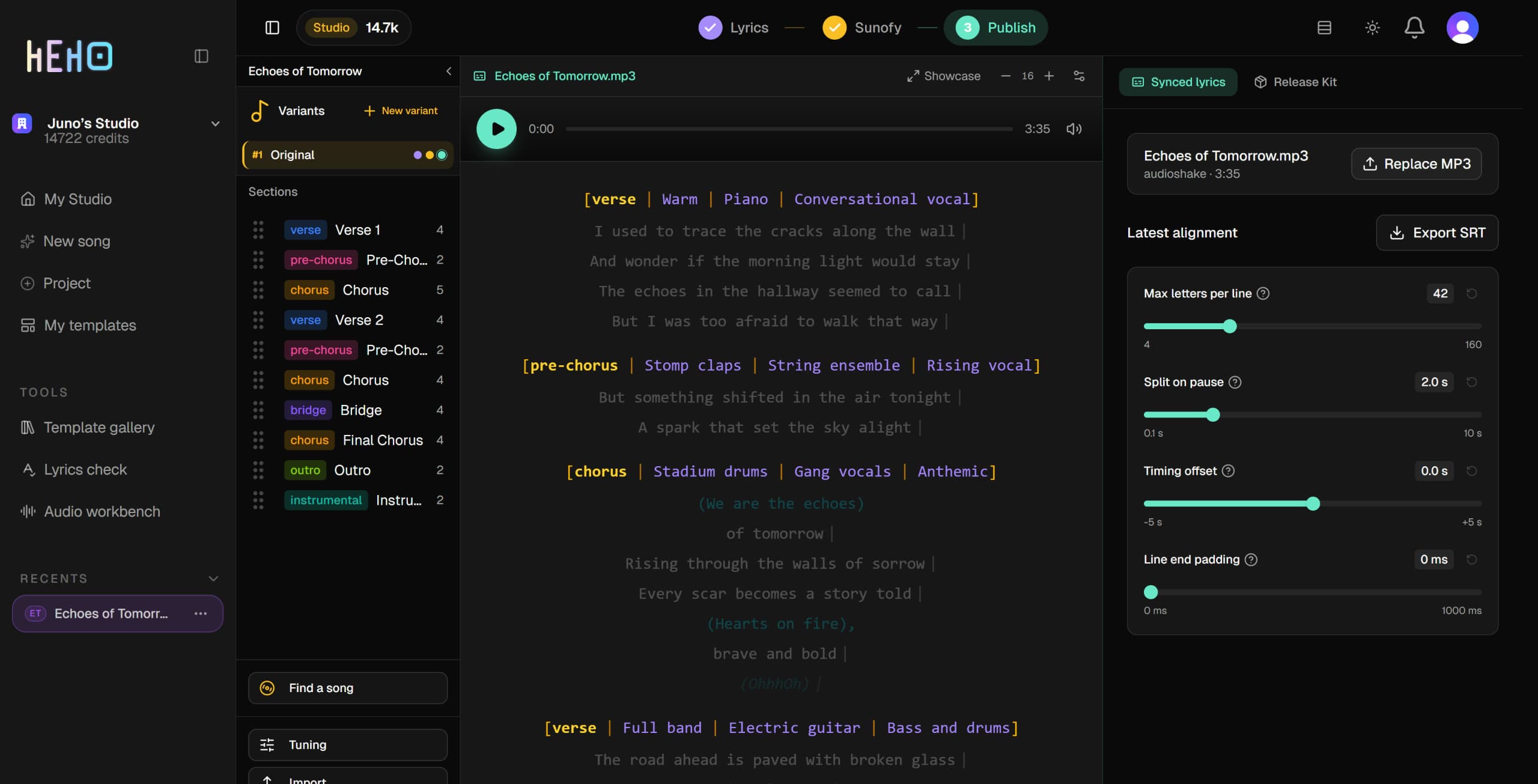
Take the song beyond the writing room

Once the draft is locked, Heho helps you turn it into release-ready copy and publishing assets without leaving the same workspace.
Screenshot of the Heho publish and release workflow
Publish workflow

Generate the assets that help the song move

Build video concepts, thumbnail ideas, titles, descriptions, and social-ready copy from the same project so release work stays connected to the song.

Create release-ready titles, descriptions, and posting angles from the final draft.
Generate thumbnail and visual directions that stay aligned with the song theme.
Keep lyrics, Sunofy context, and release assets tied to one project instead of scattered across tools.
Ready to finish your next hit?
Start with a structured workspace built for drafting, revising, and refining lyrics.